Verbose vs Brief Mode
Choose how Betty responds based on your workflow. Full mentorship explanations or quick, actionable cues.
Choose Your Style
Verbose
Full mentorship mode. Betty explains the "why" behind every recommendation, teaches concepts, and provides detailed context.
Example response:
"Your kick is sitting around -8dB which is a solid starting point. For this rock mix, I'd suggest bringing it up to -6dB to give it more punch. The reason is that rock drums typically need to cut through dense guitar layers. You might also want to add a gentle high-pass around 30Hz to clean up any sub rumble..."
Best for: Learning, exploring options, understanding decisions
Brief
Quick cues mode. Betty gives you the essential information fast—values, actions, and direct answers without lengthy explanations.
Example response:
"Kick at -6dB. HP at 30Hz."
Best for: Fast workflow, experienced producers, quick checks
How to Change Your Setting
Find the Output toggle in Betty's main window, near the voice input controls.
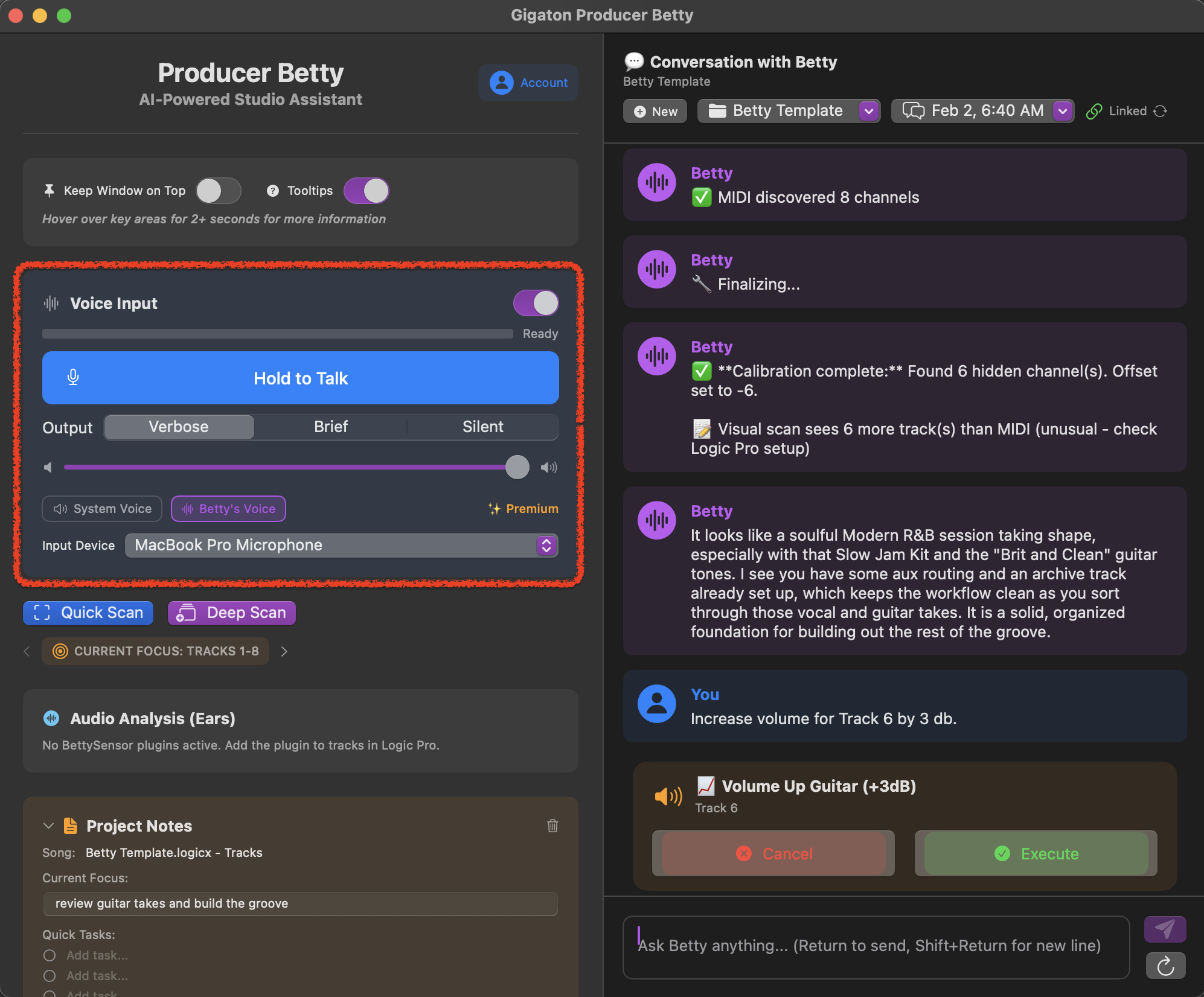
Steps:
- 1Look for the Output section below the voice input
- 2Click Verbose or Brief to switch modes
- 3Your preference is saved automatically
Silent Mode
There's also a Silent option that disables Betty's voice output entirely. Text responses still appear, but Betty won't speak them aloud.
When to use Silent mode:
- •Recording vocals or acoustic instruments
- •Working late and don't want audio output
- •Prefer reading responses over hearing them
Voice Output Options
Betty can respond using different voice providers. Find these options in the voice settings area.
System Voice
Uses your Mac's built-in text-to-speech. Fast and works offline.
Betty's VoicePro
Natural AI voice with Betty's personality. Requires internet connection.
When to Switch Modes
📚Use Verbose when...
- • You're learning a new technique
- • You want to understand the reasoning behind a suggestion
- • You're exploring creative options
- • You have time to absorb detailed feedback
⚡Use Brief when...
- • You're in the zone and need quick answers
- • You already know the concepts and just need values
- • You're doing rapid A/B comparisons
- • You want minimal interruption to your flow
💡 Pro Tip: Switch on the fly
You can switch between Verbose and Brief at any time during a session. Start in Verbose to understand Betty's approach, then switch to Brief once you're comfortable with the workflow.